Showing posts with label Black template. Show all posts

Wednesday, October 1, 2008

Special Template: Selamat Hari Raya Aidilfitri

Selamat Hari Raya Aidilfitri diucapkan kepada semua muslimin dan muslimat di Malaysia. Sempena dengan hari yang mulia ini, kami di sini menyediakan satu templat khas Aidilfitri untuk semua pengguna Blogger blog, khususnya mereka yang beragama Islam. Selamat menjamu selera.

Translation: Happy Eid Day to all muslims in Malaysia. On this blessed day, we here are providing a special Eid Fitr template for all Blogger bloggers, especially for muslims. Bon a' petite.

----------------------------------

This free Blogger template can be either a 2- or 5-column template. If you want a 2-column template, simply don't fill in the lowerbar widgets and make its colors blend with the post column.

The right sidebar is 200 px wide. Note: You can always change the header image to change the Eid theme if you prefer.


Features
Important: Change your template without loosing any sidebar widgets.
Help links: template installation guides and instructions.

Header Image
To put the header image in your blog, left-click on the image below and save the actual size into your computer. Then, upload the image using the Layout > Page Elements > Header Edit tab. If you want to use your own image for the header, the image width has to be 850 pixels (with any height).

Header image credit: adapted from Daud M (credit accordingly if used).

Terms of Use
The template is free but please value our hours of design work by leaving the footer credit to Ourblogtemplates.com intact.

Sunday, September 28, 2008

XML Blogger Template: Romantico

This free Blogger template can be either a 3- or 6-column template. If you want a 3-column template, simply don't fill in the lowerbar widgets and make its colors blend with the post column.

The left sidebar is 160 px wide and the middle sidebar is 120 px wide.


Features
Help links: template installation guides and instructions.

Header Image
To put the header image in your blog, left-click on the image below and save the actual size into your computer. Then, upload the image using the Layout > Page Elements > Header Edit tab. If you want to use your own image for the header, the image width has to be 980 pixels (with any height).

Header image credit: adapted from Jsome1 (credit accordingly if used).

Terms of Use
The template is free but please value our hours of design work by leaving the footer credit to Ourblogtemplates.com intact.

Wednesday, September 24, 2008

XML Blogger Template: Inspiration

This free Blogger template can be either a 3- or 6-column template. If you want a 3-column template, simply don't fill in the lowerbar widgets and make its colors blend with the post column.

The right sidebar is 300 pixels wide, great for the placement of a large Adsense square box, or if you want to put large pictures like in the test blog below.


Features
Help links: template installation guides and instructions.

Header Image
To put the header image in your blog, left-click on the image below and save the actual size into your computer. Then, upload the image using the Layout > Page Elements > Header Edit tab. If you want to use your own image for the header, the image width has to be 930 pixels (with any height).


Terms of Use

The template is free but please value our hours of design work by leaving the footer credit to Ourblogtemplates.com intact.

Sunday, September 21, 2008

OBT Web Design: Trap

This free Blogger template can be either a 3- or 6-column template. If you want a 3-column template, simply don't fill in the lowerbar widgets and make its colors blend with the post column.

The right sidebar is 336 pixels wide, great for the placement of a large Adsense square box, or if you want to put large pictures like in the test blog below.


Features
Help links: template installation guides and instructions.

Header Image
To put the header image in your blog, left-click on the image below and save the actual size into your computer. Then, upload the image using the Layout > Page Elements > Header Edit tab. If you want to use your own image for the header, the image width has to be 930 pixels (with any height).


Terms of Use

The template is free but please value our hours of design work by leaving the footer credit to Ourblogtemplates.com intact.

Blogger Template: Artsy

This free Blogger template can be either a 3- or 6-column template. If you want a 3-column template, simply don't fill in the lowerbar widgets and make its colors blend with the post column.

The right sidebar is 336 pixels wide, great for the placement of a large Adsense square box, or if you want to put large pictures like in the test blog below.


Features
Help links: template installation guides and instructions.

Header Image
To put the header image in your blog, left-click on the image below and save the actual size into your computer. Then, upload the image using the Layout > Page Elements > Header Edit tab. If you want to use your own image for the header, the image width has to be 930 pixels (with any height).


Terms of Use

The template is free but please value our hours of design work by leaving the footer credit to Ourblogtemplates.com intact.

Thursday, September 18, 2008

Blogger Template: Digi-digi

This free Blogger template can be either a 3- or 6-column template. The right-most sidebar is made 336px wide so that you can put the large Adsense square ads (in case you want to). If you want a 3-column template, simply don't fill in the lowerbar widgets and make its colors blend with the post column.

The right sidebar is 336 pixels wide, great for the placement of a large Adsense square box, or if you want to put large pictures like in the test blog below.


Features
Help links: template installation guides and instructions.

Terms of Use

The template is free but please value our hours of design work by leaving the footer credit to Ourblogtemplates.com intact.

Wednesday, September 17, 2008

Blogger Template: Sunset

This free Blogger template can be either a 3- or 6-column template. If you want a 3-column template, simply don't fill in the lowerbar widgets and make its colors blend with the post column.


Features
Help links: template installation guides and instructions.

Header Image
To put the header image in your blog, left-click on the image below and save the actual size into your computer. Then, upload the image using the Layout > Page Elements > Header Edit tab. If you want to use your own image for the header, the image width has to be 950 pixels (with any height).


Terms of Use

The template is free but please value our hours of design work by leaving the footer credit to Ourblogtemplates.com intact.

Tuesday, September 16, 2008

Blogger Template: Nightingale

This free Blogger template can be either a 3- or 6-column template. If you want a 3-column template, simply don't fill in the lowerbar widgets and make its colors blend with the post column.

Download Template | Other Templates

Features
Help links: template installation guides and instructions.

Terms of Use

The template is free but please value our hours of design work by leaving the footer credit to Ourblogtemplates.com intact.

Sunday, August 24, 2008

Insurance

Insurance is a slightly modified version of the Brooklyn Blogger template.


Header Image
To put the header image in your blog, left-click on the image below and save the actual size into your computer. Then, upload the image into the Header Page Element in the Layout section of your blog.

Header image credit: adapted from wallpaperstock.net.

If you want to use your own image for the header, the image has to be 800 pixels wide (with any height) to fit the header nicely. Click here for more helpful links on template installation guides and instructions.

Terms of Use
The template is free but please value our hours of design work by leaving the footer credit to Ourblogtemplates.com intact.

Wednesday, August 20, 2008

Blogger Template: Contemplation

This is a flexible 3 or 6 columns template, with additional 3 columns below the post section. 99% of the colors and fonts can be easily changed from the Layout Section.


Header Image
The header image doesn't come with the template file. To put the header image in your blog, left-click on the image below and save the actual size into your computer. Then, upload the image into the Header Page Element in the Layout section of your blog.

Header image credit: adapted from pixdaus.com.

If you want to use your own image for the header, the image has to be 800 pixels wide (with any height) to fit the header nicely. Click here for more helpful links on template installation guides and instructions.

Terms of Use
The template is free but please value our hours of design work by leaving the footer credit to Ourblogtemplates.com intact.

Monday, August 18, 2008

Blogger Template: Froggy

This is a flexible 3 or 6 columns template, with additional 3 columns below the post section. Scroll to the bottom of the post to download the template.

Header Image
The header image doesn't come with the template file. To put the header image in your blog, left-click on the image below and save the actual size into your computer. Then, upload the image into the Header Page Element in the Layout section of your blog.

Header image credit: adapted from pixdaus.com.

If you want to use your own image for the header, the image has to be 800 pixels wide (with any height) to fit the header nicely. Click here for more helpful links on template installation guides and instructions.

Terms of Use
The template is free but please value our hours of design work by leaving the footer credit to Ourblogtemplates.com intact.

Get the Template

Sunday, August 10, 2008

Blogger Template: Mantis


Header Image
The header image doesn't come with the template file. To put the header image in your blog, left-click on the image below and save the actual size into your computer. Then, upload the image into the Header Page Element in the Layout section of your blog.

Header image credit: adapted from mysza831.

If you want to use your own image for the header, the image has to be 820 pixels wide (with any height) to fit the header nicely. Click here for more helpful links on template installation guides and instructions.

Terms of Use
The template is free but please value our hours of design work by leaving the footer credit to Ourblogtemplates.com intact.

Saturday, August 9, 2008

Blogger Template: Darken


This is a simple template perfect for a personal blog. There's 1 sidebar column on the right and 3 sidebar columns at the bottom, which not many free blogger templates have. You can use the header image as in the sample blog or your own header image.

Header Image
The header image doesn't come with the template file. To put the header image in your blog, left-click on the image below and save the actual size into your computer. Then, upload the image into the Header Page Element in the Layout section of your blog.

Header image credit: adapted from atomicjeep.

If you want to use your own image for the header, the image has to be 740 pixels wide (with any height) to fit the header nicely. Click here for more helpful links on template installation guides and instructions.

Terms of Use
The template is free but please value our hours of design work by leaving the footer credit to Ourblogtemplates.com intact.

Thursday, July 10, 2008

Blogger Template: Portrait


Header Image
The header image doesn't come with the template file. To put the header image in your blog, left-click on the image below and save the actual size into your computer. Then, upload the image into the Header Page Element in the Layout section of your blog.

Header image credit: adapted from DualScreen Wallpaper.

If you want to use your own image for the header, the image has to be 777 pixels wide (with any height) to fit the header nicely. DO NOT click the 'Shrink to Fit' option in the Edit Header box because it'll make the image bigger. Click here for more helpful links on template installation guides and instructions.

UPDATE: Read this if you have a problem adding a header image without the Blog Title and Description.

Terms of Use
The template is free but please value our hours of design work by leaving the footer credit to Ourblogtemplates.com intact.

Friday, June 27, 2008

Blogger Template: Grease


This is a multiple-column template: 3 sidebar columns on the right, 3 columns below the post, and 3 additional leaderboard-size columns to place ad banners! The template image above is captured from a 1024 pixels wide screen.

Header Image
The header image doesn't come with the template file. To put the header image in your blog, left-click on the image below and save the actual size into your computer. Then, upload the image into the Header Page Element in the Layout section of your blog.

Header image credit: adapted from dmb.

If you want to use your own image for the header, the image has to be 938 pixels wide (with any height) to fit the header nicely. DO NOT click the 'Shrink to Fit' option in the Edit Header box because it'll make the image smaller than 940px. Click here for more helpful links on template installation guides and instructions.

UPDATE: Read this if you have a problem adding a header image without the Blog Title and Description.

Ads
This template was customized so that you can put ads in a lot of places. In addition to the usual sidebar, header, and main columns, you can place long leaderboard-size ads above and below the blog and above the footer. Check out these ads locations in this test blog.

Terms of Use
The template is free but please value our hours of design work by leaving the footer credit to Ourblogtemplates.com intact.

Thursday, June 26, 2008

Blogger Template: Tranquility


This is a multiple-column template: 3 sidebar columns on the right, 3 columns below the post, and 3 additional leaderboard-size columns to place ad banners! The template image above is captured from a 1024 pixels wide screen.

Header Image
The header image doesn't come with the template file. To put the header image in your blog, left-click on the image below and save the actual size into your computer. Then, upload the image into the Header Page Element in the Layout section of your blog.

Header image credit: adapted from dmb.

If you want to use your own image for the header, the image has to be 938 pixels wide (with any height) to fit the header nicely. DO NOT click the 'Shrink to Fit' option in the Edit Header box because it'll make the image smaller than 940px. Click here for more helpful links on template installation guides and instructions.

UPDATE: Read this if you have a problem adding a header image without the Blog Title and Description.

Ads
This template was customized so that you can put ads in a lot of places. In addition to the usual sidebar, header, and main columns, you can place long leaderboard-size ads above and below the blog and above the footer. Check out these ads locations in this test blog.

Terms of Use
The template is free but please value our hours of design work by leaving the footer credit to Ourblogtemplates.com intact.

Wednesday, June 25, 2008

Blogger Template: Ultimatum


This one is great for you if you like lots of columns. 3 sidebar columns on the right, 3 columns below the post, and 3 additional leaderboard-size columns to place ad banners! The template image above is captured from a 1024 pixels wide screen.

Header Image
The header image doesn't come with the template file. To put the header image in your blog, left-click on the image below and save the actual size into your computer. Then, upload the image into the Header Page Element in the Layout section of your blog.

Header image credit: adapted from dmb (design by David Biers).

If you want to use your own image for the header, the image has to be 938 pixels wide (with any height) to fit the header nicely. DO NOT click the 'Shrink to Fit' option in the Edit Header box because it'll make the image smaller than 940px. Click here for more helpful links on template installation guides and instructions.

UPDATE: Read this if you have a problem adding a header image without the Blog Title and Description.

Ads
This template was customized so that you can put ads in a lot of places. In addition to the usual sidebar, header, and main columns, you can place long leaderboard-size ads above and below the blog and above the footer. Check out these ads locations in this test blog.

Terms of Use
The template is free but please value our hours of design work by leaving the footer credit to Ourblogtemplates.com intact.

Wednesday, May 14, 2008

The Pattern


The template image is captured from a 1024 pixels wide screen. This template has 3 'sidebar' columns below the post column. The theme is photoblog - the post column is wide without any other columns next to it. This style is especially great if you want to build a photo blog with lots of large photos and images. Click here to learn how to post large photos and images in your blog.

Header Image
The header image doesn't come with the template file. To put the header image in your blog, left-click on the image below and save the actual size into your computer. Then, upload the image into the Header Page Element in the Layout section of your blog.

Header image credit: adapted from DinPattern.

If you want to use your own image for the header, the image has to be 920 pixels wide (with any height) to fit the header nicely. Click here for more helpful links on template installation guides and instructions.

Ads
This template was customized so that you can put ads in a lot of places. In addition to the usual sidebar, header, and main columns, you can place long leaderboard-size ads above and below the blog and above the footer. Check out these ads locations in this test blog.

Terms of Use
The template is free but please value our hours of design work by leaving the footer credit to Ourblogtemplates.com intact.

Friday, May 2, 2008

Computer Logo


The template image is captured from a 1024 pixels wide screen. This template has 2 more columns below the post column.

Header Image
The header image doesn't come with the template file. To put the header image in your blog, click on the image below and save it into your computer. Then, upload the image into the Header Page Element in the Layout section of your blog.

Header image credit: adapted from EpicWallpaper.

If you want to use your own image for the header, the image has to be 750 pixels wide (with any height) to fit the header nicely. Click here for more helpful links on template installation guides and instructions.

Ads
This template was customized so that you can put ads in a lot of places. In addition to the usual sidebar, header, and main columns, you can place long leaderboard-size ads above and below the blog and above the footer. Check out these ads locations in this test blog.

Terms of Use
The template is free but please value our hours of design work by leaving the footer credit to Ourblogtemplates.com intact.

Blogger Templates: Blissful View


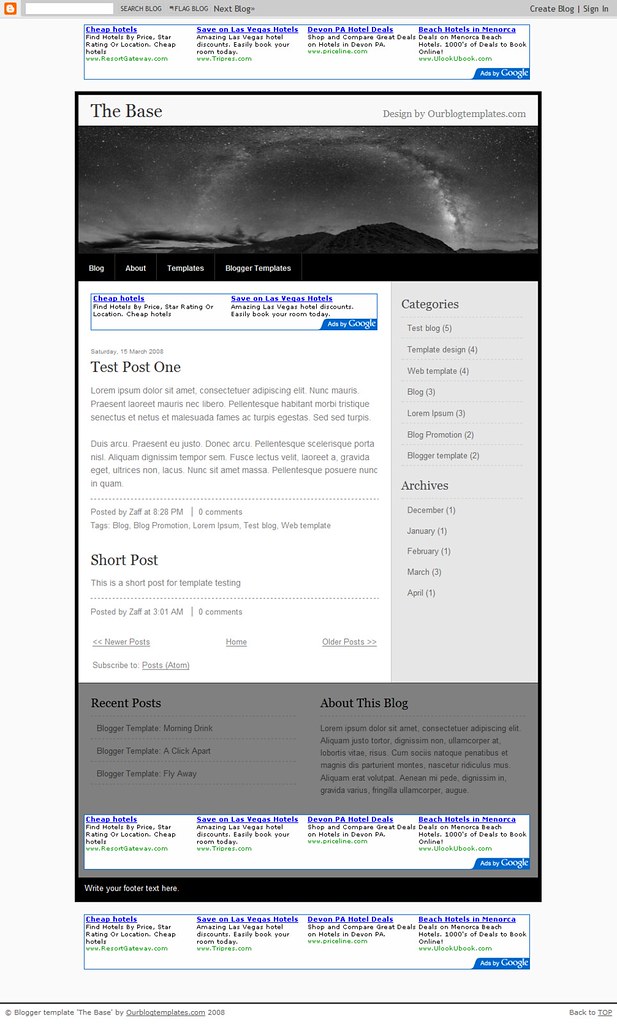
The template image is captured from a 1024 pixels wide screen. This template has 2 more columns below the post column.
Header Image
The header image doesn't come with the template file. To put the header image in your blog, click on the image below and save it into your computer. Then, upload the image into the Header Page Element in the Layout section of your blog.

Header image credit: adapted from Quality Wallpapers.

If you want to use your own image for the header, the image has to be 750 pixels wide (with any height) to fit the header nicely. Click here for more helpful links on template installation guides and instructions.

Ads
This template was customized so that you can put ads in a lot of places. In addition to the usual sidebar, header, and main columns, you can place long leaderboard-size ads above and below the blog and above the footer. Check out these ads locations in this test blog.

Terms of Use
The template is free but please value our hours of design work by leaving the footer credit to Ourblogtemplates.com intact.